


January 20, 2025 - Written by ILLUIN Technology and BentoML
At ILLUIN Technology, we master data and ML engineering / Ops solutions for the R&D and governance of our artificial intelligence solutions. BentoML is a cornerstone of our MLOps stack, addressing major issues such as model and service packaging, versioning, deployment and observability.
We recently collaborated with the BentoML team to deploy our open-source visual search modelColPali. To share our results, we wrote this article together.
Introduction
Document retrieval systems have traditionally relied on complex document ingestion pipelines, comprising several independent steps such as OCR, layout analysis and caption identification. Integrating visual elements into the search process is a real challenge, and involves many arbitrary choices.
What if we could simplify this process while improving accuracy?
This is the aim of ColPali, a model combining the power of Vision Language Models (VLMs) and multi-vector embeddings. In this article, we show you how to deploy a functional ColPali inference API using BentoML, harnessing the power of visual embeddings for large-scale document searches.
What is ColPali?
With our ColPali approach, we use VLMs to build rich multi-vector embeddings directly from document images ("screenshots"), intended for document retrieval. For a given query, the model is trained to maximize the similarity between the embedding of this query and that of the associated page, by applying the late interaction (or MaxSim) method introduced in ColBERT (Khattab et al., 2020).
ColPali replaces complex OCR-based text retrieval pipelines with a single model capable of taking into account both the textual and visual content (layout, graphics, etc.) of a document. In addition to its simplicity, ColPali is faster and more efficient than OCR-based pipelines, and has the major advantage of being able to be trained end-to-end to suit industry-specific data distributions.
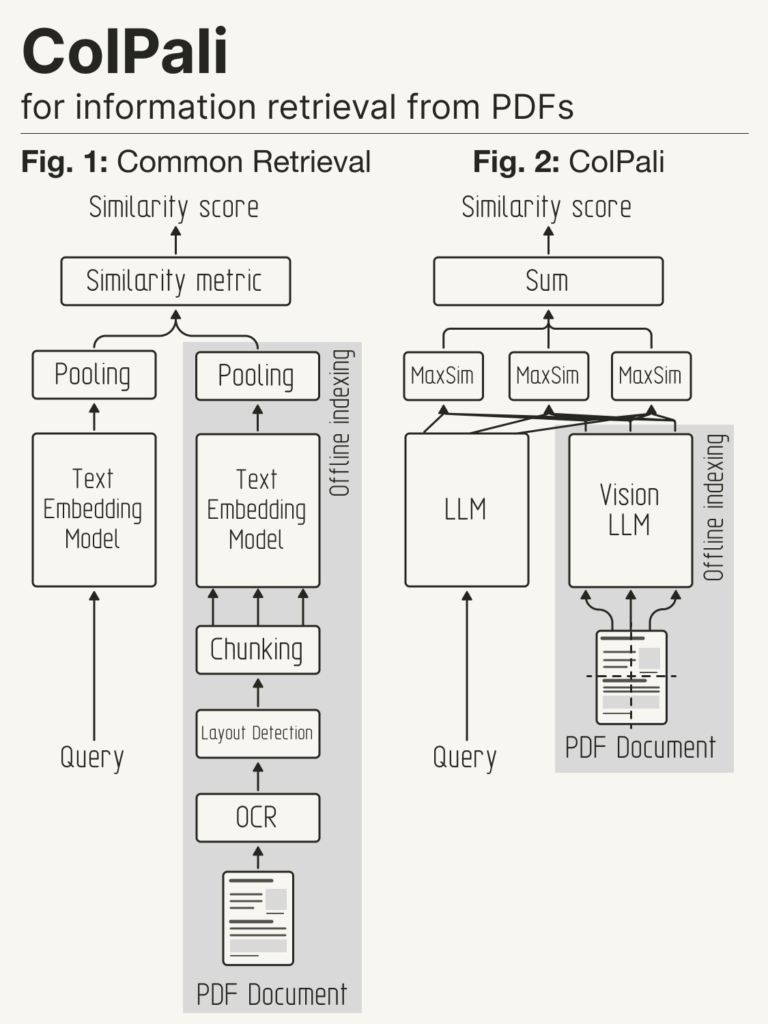
Courtesy of @helloiamleonie.
Source : https://x.com/helloiamleonie/status/1839321865195851859.
What is BentoML?
BentoML is a unified inference platform for designing and scaling AI systems with any model, on any cloud. It includes:
-
-
- the BentoML open-source model serving framework: a Python framework offering key features for inference optimization, task queuing, batching and distributed orchestration. Developers can deploy models in different formats, customize deployment logic and build reliable, scalable AI applications.
-
-
-
- BentoCloud: an inference management platform and compute orchestration engine based on the open-source BentoML framework. BentoCloud offers a complete stack for fast, scalable AI systems, with flexible Python APIs, ultra-fast cold launches and optimized workflows for development, testing, deployment and CI/CD.
-
ColPali deployment challenges
Deploying ColPali efficiently poses a unique operational challenge due to its multi-vector embedding approach. The large memory footprint required to store and retrieve multiple vectors per document page/image calls for adaptive batching strategies to optimize memory usage.
BentoML meets these challenges with features such as adaptive batching and zero copy I/O mechanisms, minimizing overhead even with large volumes of vector data.
In this article, we store vectors in memory for simplicity, but for a scalable production environment, a vector database is highly recommended. ColPali generates a multi-vector representation, one vector per image section. However, most traditional vector databases store a single vector per entry/document.
Currently, only a few databases support multi-vector representations, such as Milvus, Qdrant, Weaviate, or Vespa. Others, such as Elasticsearch, are working on this functionality. To industrialize ColPali on a large scale, we recommend choosing a vector database adapted to multi-vector representation.
Setup
To begin with, duplicate the project repository and move to the relevant directory. It contains everything you need for deployment.
git clone https://github.com/bentoml/BentoColPali.gitcd BentoColPali
We recommend that you create a virtual Python environment to isolate :
python -m venv bento-colpali

source bento-colpali/bin/activate
Install the required dependencies:
# Recommend Python 3.11

pip install -r requirements.txt
Download model
Before running the project, download and build the ColPali model. This uses PaliGemma as its VLM backbone.
The Hugging Face account associated with the supplied token must have accepted the terms and conditions of google/paligemma-3b-mix-448.
python bentocolpali/models.py --model-name vidore/colpali-v1.2

--hf-token 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
Check the template download by listing your BentoML templates:
$ bentoml models list

Tag

Creation Time

colpali_model:mcao35vy725e6o6s

2024-12-13 03:00:15

Module Size

5.48 GiB
Deploying the model with BentoML
When the model is ready, launch the BentoML server locally:
bentoml serve .
This command triggers the BentoLM server and exposes four endpoints:
http://localhost:3000:
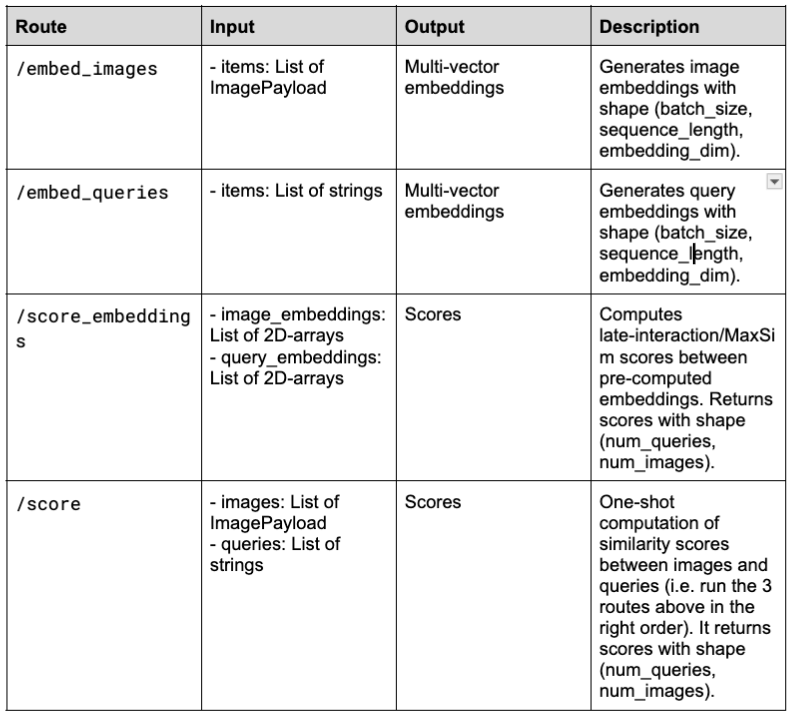
Adaptative Batching
In this project, BentoML's adaptive batching is activated for the /embed_images and /embed_queries endpoints. This dynamically adjusts batch size and timing according to real-time traffic. Configure max_batch_size and max_latency_ms to maximize throughput while maintaining acceptable latency.
Here is an example configuration:
# Use the @bentoml.service decorator to mark a Python class as a BentoML Service

@bentoml.service(

name="colpali",

workers=1,

traffic={"concurrency": 64}, # Set concurrency to match the batch size

)

class ColPaliService:

...

@bentoml.api(

batchable=True, # Enable adaptive batching

batch_dim=(0, 0), # The batch dimension for both input and output

max_batch_size=64, # The upper limit of the batch size

max_latency_ms=30_000, # The maximum milliseconds a batch waits to accumulate requests

)

async def embed_images(

self,

items: List[ImagePayload],

) -> np.ndarray:

...
For more information, see the BentoML documentation and the full source code.
Call for APIs
To interact with APIs, you can create a client to send requests to the server. Here's an example:
import bentoml

from PIL import Image

from bentocolpali.interfaces import ImagePayload

from bentocolpali.utils import convert_pil_to_b64_image

# Prepare image payloads

image_filepaths = ["page_1.jpg", "page_2.jpg"]

image_payloads = []

for filepath in image_filepaths:

image = Image.open(filepath)

image_payloads.append(ImagePayload(url=convert_pil_to_b64_image(image)))

# Prepare queries

queries = [

"How does the positional encoding work?",

"How does the scaled dot attention product work?",

]

# Create a BentoML client and call the endpoints

with bentoml.SyncHTTPClient("http://localhost:3000") as client:

image_embeddings = client.embed_images(items=image_payloads)

query_embeddings = client.embed_queries(items=queries)

scores = client.score_embeddings(

image_embeddings=image_embeddings,

query_embeddings=query_embeddings,

)

print(scores)
Note that ImagePayload requires images to be base64 encoded in the format:
{

"url": "data:image/png;base64,iVBORw0KGgoAAAANSUhEU..."

}
Sample result:
[

[16.1253643, 6.63720989],

[9.21852779, 15.88411903]

]
Deployment on BentoCloud
Once the solution has been tested locally, deploy the ColPali service on BentoCloud to benefit from a secure, scalable and reliable inference API.
Now that everything's working locally, it's time to deploy the ColPali service to BentoCloud. This gives you a secure, scalable and reliable inference API.
Before deployment, make sure the necessary resources are specified in the bentocolpali/service.py file via the @bentoml.service decorator.
For this example, a single NVIDIA T4 GPU is sufficient:
@bentoml.service(

name="colpali",

workers=1,

resources={

"gpu": 1, # The number of GPUs

"gpu_type": "nvidia-tesla-t4", # The GPU type

},

traffic={"concurrency": 64},

)
Login to BentoCloud. Sign-up here for free if you don't have a BentoCloud account:
bentoml cloud login
Go to your project's root directory (where the bentofile.yaml file is located). Run the following command to deploy it on BentoCloud and, if necessary, define a name with the -n option:
bentoml deploy . -n colpali-bento
Once the deployment has been finalized, you can find it in the Deployments section.
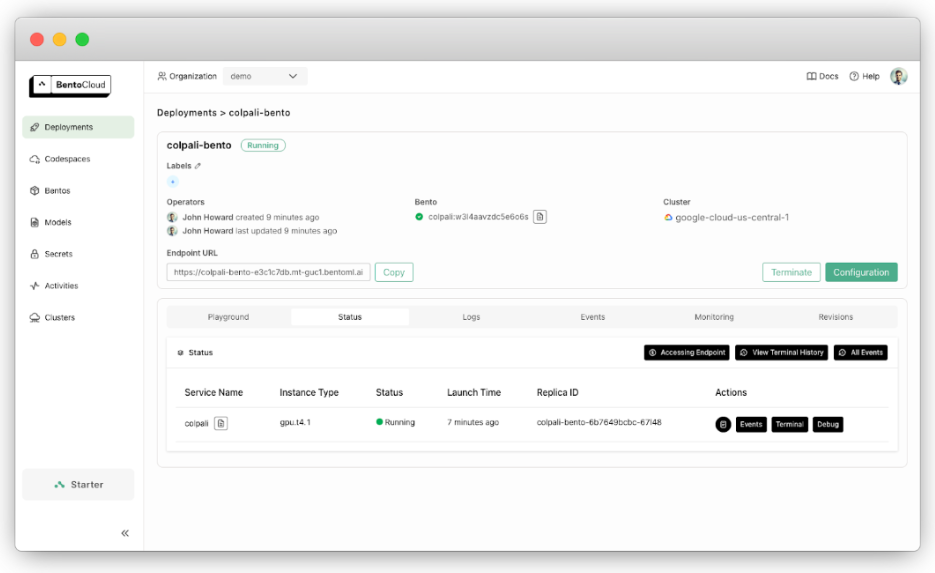
To view the exposed URL, use :
bentoml deployment get colpali-bento -o json | jq ."endpoint_urls"
Replace http://localhost:3000 in the previous client code with the retrieved URL, and you'll be able to make the same API calls.
By default, the deployment has a single replica, but you can adapt it to your needs. For example, to go from 0 to 5 replicas, use :
bentoml deployment update colpali-bento --scaling-min 0 --scaling-max 5
This minimizes resource use during periods of inactivity, while efficiently managing high traffic levels thanks to fast cold-start times.
Conclusion
In this tutorial, we show how to deploy ColPali with BentoML to create an inference API that understands both textual and visual content without requiring complex OCR pipelines. The solution is easily deployed locally or scalable in production with BentoCloud. Try it out to simplify your document processing workflows!
More resources :


